01
Match
Create assignments with scope, role, location, urgency, and rate terms. Review professionals by credential, specialty, service area, and availability.
Assign2Field connects four steps: match qualified professionals, offer assignments, work the file, and review billing. Matching considers role, licensing, specialty, service territory, availability, and assignment terms. Professionals accept or clarify the offer, submit work inside the file, and have invoices reviewed against terms, activity records, and approval status.
Assign2Field doesn't replace your vendor relationships or your internal team. It gives everyone in the workflow direct visibility into who's doing the work, while your existing partnerships stay intact.
Assign2Field turns external claim work into controlled assignments. Visible professionals, approved collaboration, transparent billing, and reviewable history—all inside one file.
Create assignments with scope, role, location, urgency, and rate terms. Review professionals by credential, specialty, service area, and availability.
Professionals accept, decline, or request clarification before work begins.
Assigned professionals upload notes, photos, reports, estimates, invoices, and supporting documents inside the file.
Compare submitted vendor invoices against assignment terms, activity records, and approval status.
From assignment to invoice, Assign2Field keeps the professional, documents, collaboration, billing status, and review history connected in one controlled workflow.
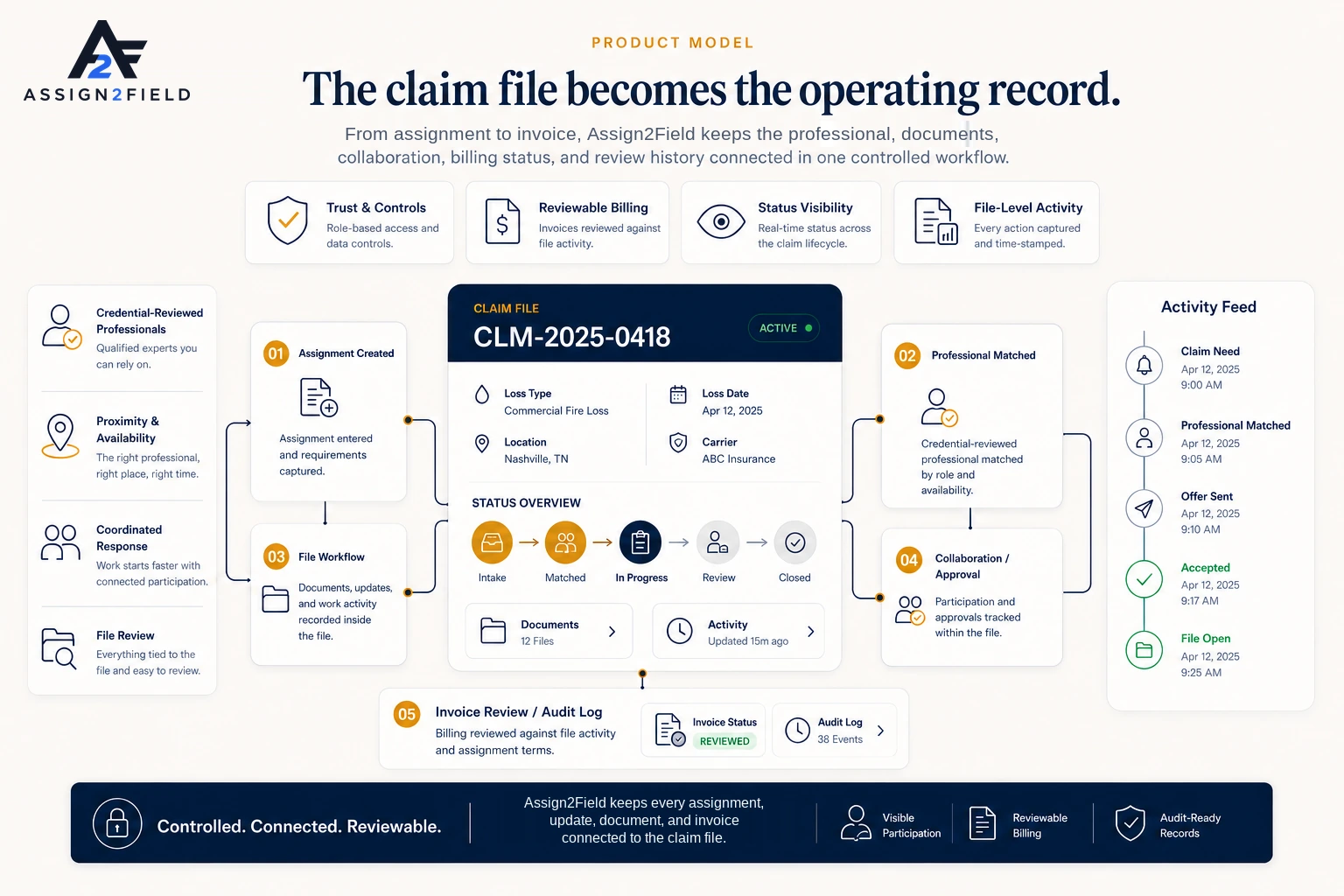
Bring assignments, professionals, documents, collaboration, billing, and audit history into one unified workflow.
Request a demo